Create deep links to open the app - Prenly
To drive traffic to your iOS and Android apps, you can send out links that automatically open the app when the user clicks on them on a mobile device.
These types of links are often colloquially referred to as deep links, but technically they are called "Universal links" in iOS and "App Links" in Android.
Most Prenly apps automatically support deep linking, but if your app doesn't support it, it may need to be updated.
You can check if deep linking works by copying some urls from the web reader, pasting into an email, sending the email to yourself, and opening the email on an iOS or Android device.
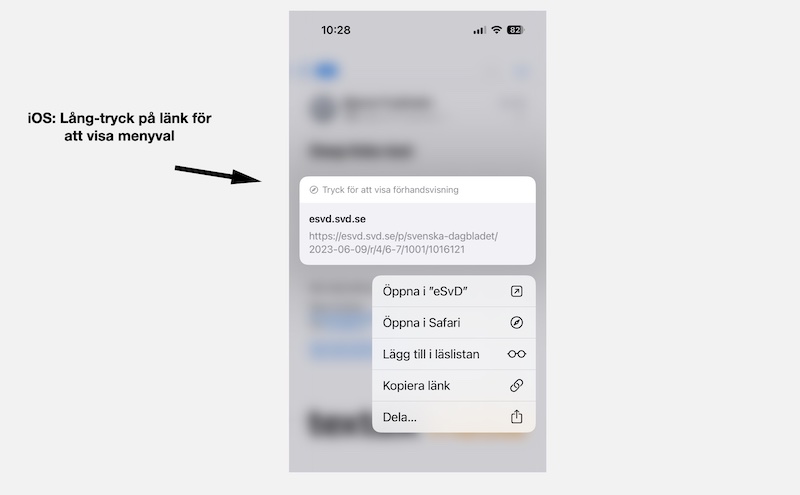 Long press on a link to show that it can be opened in either the app or Safari.
The links that work are of the type:
- Link to home page: Example https://etidning.dn.se/
- Link to a page in an issue: Example https://esvd.svd.se/p/svenska-dagbladet/2023-06-09/r/4/6-7/1001/1016121
- Link to article page: Example https://eavis.lokalavisen.dk/p/folkebladet/07-06-2023/a/auning-aktivitetspark-vokser-spaden-gar-snart-i-jorden-til-naeste-etape/2645/1012971/40483101
- Link to title page and title summary (only available in some applications): Example https://emagasin.arcy.se/titles
https://emagasin.arcy.se/title/amelia/3051
- Link to the archive: Example https://eavis.lokalavisen.dk/search
- Dynamic link to the latest issue in a title: Example https://eavis.lokalavisen.dk/p/adresseavisen/latest/2637
Please note that this link must be created using the title-slug and title-id - which you will find in the regular url that the dynamic link opens, when typed, it points to
https://eavis.lokalavisen.dk/p/adresseavisen/07-06-2023/r/1/1/2637/1012975
where title-slug is "addresseavisen" and title-id is "2637".
If the deep linking works properly, you can also in iOS - if you long press on a link in Mail - open a menu where you can choose whether you want to open the link in the Prenly application or in Safari.
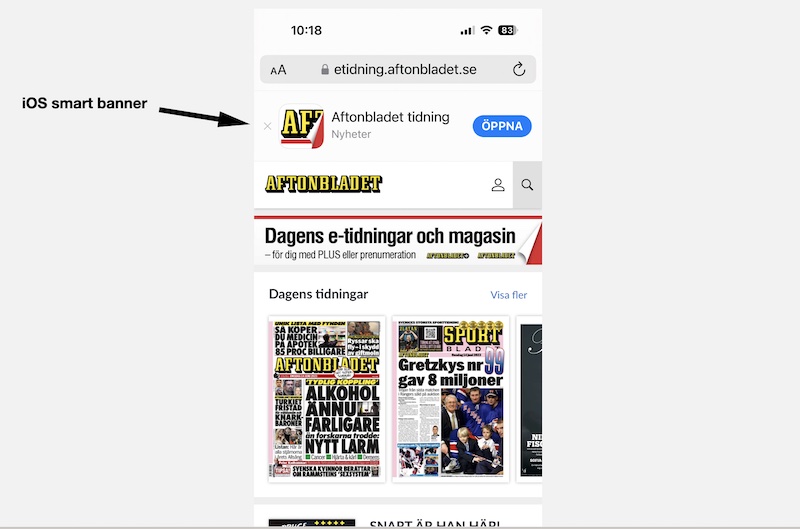 The iOS smart banner appears at the top of the mobile web page in Safari.
Please note that not all Prenly applications are yet configured to support deep links. Please contact our helpdesk (hello@prenly.com) if your app does not work with deep links.
Also note that deep links only open the app when you open a link from another application or webpage outside your own domain. If you manually enter a link in Safari or use a bookmark in Safari, the link will open in Safari.
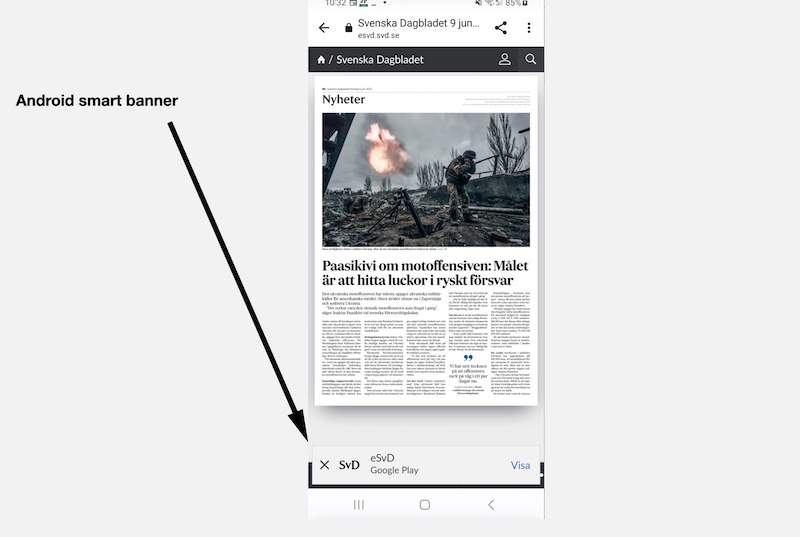 In Chrome for Android, the smart banner appears at the bottom of the webpage.
If the app is not installed on your device, or the app cannot be opened for some reason, a "smart banner" should appear at the top of mobile Safari.
There you can easily open the app or go to the AppStore to download it.
The Android smart banner appears at the bottom of the webpage in mobile Chrome.
If you click to close a smart banner, you can get it back by clearing your browser's cache.